Text Moderation in Images and Videos
text-content-2.0Detect profanity, personally identifiable information (PII) such as email addresses and phone numbers, links and URLs, and other unwanted text content in images and videos.
Overview
The Visual Text Moderation API detects unwanted, hateful, sexual, and toxic content within images and videos across 23+ moderation categories in 16+ languages. It uses advanced rules and pattern-matching techniques to identify problematic text, even when users attempt to obfuscate it. The moderation results include the detected language, triggered moderation categories, and detailed information about flagged words or expressions.
Customization
This API is highly customizable. You can tailor it to your needs by:
Listing Moderation Categories
Select exactly which categories you want to be evaluated in the API request.
Choosing Languages
Target a specific list of languages applicable to your users or community.
Filtering by Severity
Filter your moderation results based on the detected severity level.
Providing Custom Lists
Apply your own custom disallow and allow lists of words and expressions.
Use the OCR API to retrieve the raw text extracted from your image or video.
Moderation categories
The categories to be evaluated must be specified in the text_categories parameter of your API request, as a comma-separated list. The response will only contain results for the selected categories.
Sexual & Suggestive
sexual- Terms or expressions referring to sexual acts, sexual organs, body parts or bodily fluids typically associated with sexual acts.
- Each match is assigned a severity level ranging from low to high.
Insults & Personal Attacks
insult- Words or phrases that insult, undermine or attack the dignity or honor of an individual.
- Signs of disrespect that are generally used to refer to someone.
- Each match is assigned a severity level ranging from low to high.
Discriminatory & Hate
discriminatory- Discriminatory, hateful, or derogatory content targeting individuals or groups based on protected characteristics (e.g. religion, ethnicity, nationality, sexual orientation, gender identity).
- Each match is assigned a severity level ranging from low to high.
Inappropriate Language & Swear Words
inappropriate- Swear words, slang, vulgar language or socially inappropriate expressions used to describe something or to address someone.
- Each match is assigned a severity level ranging from low to high.
Grawlix
grawlixSequences of typographical symbols (e.g. @#$%!) that are typically used to represent obscenity or profanity.
Email Addresses
email- Email addresses
- Includes obfuscated email addresses such as john.doe [at] gmail [dot] com, john.doe@gmail, 𝒿𝑜𝒽𝓃.𝒹𝑜𝑒@𝑔𝓂𝒶𝒾𝓁.𝒸𝑜𝓂 or Jօнn.ĐØe@g𝐌aìL.cØʍ.
Phone Numbers
phone_number- Phone numbers that are valid numbers in the countries specified through the opt_countries parameter.
- Includes obfuscated numbers such as 【2one2】5-fifty-five【twElve,3 four】, ②①②⑤⑤⑤①②③④ or 𝟚1𝟚|⑤𝟝𝟝-𝟙𝟚③𝟜.
- You can select the countries to be covered through the opt_countries parameter. Provide a comma-separated list of the ISO 3166 2-letter country codes. For instance us for the United States, fr for France. See the full list of supported countries.
- If you do not specify any country, the API will default to the following list of countries: United States us, France fr, United Kingdom gb.
Usernames
usernameUsernames, social media handles (e.g. @john_doe, snapUser23, tiktok_user123).
Social Security Numbers
ssnUS social security numbers.
IP Addresses
ipIP addresses, both IPv4 and IPv6.
Link & URLs
link- URLs to external websites and pages.
- Additional information allows you to determine whether link is unsafe, deceptive or known to contain otherwise unwanted content (e.g. adult content, gambling, or drugs). More details are available on the URL and link moderation page.
Extremism
extremismWords, expressions or slogans related to extremist ideologies, people or events.
Weapons & Firearms
weaponNames or terms related to guns, rifles, firearms and other weapons (e.g. ak47, kalashnikov, mk-14).
Medical Drugs
medicalNames of prescription or over-the-counter pharmaceutical drugs (e.g. xanax, viagra, flurazepam).
Recreational Drugs
drugNames related to recreational drugs (e.g. cannabis, weed, xtc, cocaine).
Self-Harm & Suicide
self_harm- Terms related to suicide.
- Mentions of self-inflicted injuries.
- Each match is assigned a severity level ranging from low to high.
Violence & Threats
violence- Expressions of violence such as kicking, punching or harming someone, or threatening to do so.
- Each match is assigned a severity level ranging from low to high.
Platform Evasion & Circumvention Attempts
platform_evasion- Attempts to send or lure a user to another platform.
- These attempts are either for a social media platform (what's your ig?, add me on snapchat, give me ur wasap) or a device-related feature (drop ya phone number, wanna facetime?).
Off-Platform Mentions
off_platform_mention- Names of social media platforms.
- The most common social networks are supported by default (facebook, whatsapp, snapchat, instagram, etc.), as well as their variations (ig, insta, snap, snp, etc.).
Content Trade & Solicitation
content_tradeRequests or messages encouraging users to send, exchange or sell photos (send a pic of u, can i see a face pic?) or videos of themselves (do you sell videos?, can you send a recent tape?).
Money Requests & Transactions
money_transactionRequests or messages encouraging users to send money (give me 8 dollars, send ur credit card, e-transfer money).
Grooming
grooming- Minor-identifying questions.
- Sexualized statements about minors.
- Each match is assigned a severity level ranging from low to high.
Minor Presence
minor- Self-declared underage status.
- Contextual clues indicating the presence of a minor in a conversation (e.g. grade level mention).
If a disallow list is specified through the opt_textlist parameter, the API will also return matches for the terms and expressions included in the list, under the blacklist category.
Disallow list (custom)
blacklistCustom list of terms and expressions. Read more.
Language support
English is the default language used for text moderation. If no language is specified, the API assumes the text is in English and processes it accordingly
If you are confident about the language used in the message, for example, if your users primarily communicate in a specific language, you can set it using the opt_lang parameter. To do so, use the ISO 639-1 language codes:
| Language | Code |
| English (default) | en |
| Chinese | zh |
| Danish | da |
| Dutch | nl |
| Finnish | fi |
| French | fr |
| German | de |
| Italian | it |
| Korean | ko |
| Norwegian | no |
| Polish | pl |
| Portuguese | pt |
| Russian | ru |
| Spanish | es |
| Swedish | sv |
| Tagalog / Filipino | tl |
| Turkish | tr |
If you are unsure about the language used by a user, you can specify multiple languages as a comma-separated list. For example, en,fr,es for users who may write in English, French, or Spanish. The API will then automatically detect the language and apply the appropriate moderation rules. We recommend specifying the shortest possible list, as this improves both processing speed and detection accuracy.
Other languages are available upon request. Please get in touch regarding your language needs.
Detection strength
The Text Moderation API is significantly more robust than simple word-based filters. It uses advanced linguistic analysis to detect objectionable content, even when users deliberately attempt to bypass filters.
For example, for each word, the API evaluates millions of potential variations that may be used to evade detection, while smartly ignoring situations that could generate false positives. Here is a partial list of scenarios that are covered:
Characters being repeated to avoid basic word filtering.
Replacement of characters with typographical symbols.
Adding spaces, punctuation and more within words.
Unusual non-ASCII characters used to evade basic word filters.
Changing word spellings while retaining their original meaning or pronunciation.
Replacing some alphabetical characters with a combination of punctuation, digits and letters.
Catching profanity based embeddings, while smartly ignoring potential false positives such as bassguitar or amass.
Severity levels
Severity is an optional indicator used to rank harmful content from mild to extreme. It may be available at both the match level and the category level.
| Severity | Description |
| high | The highest severity level. Content that is harmful or dangerous in most contexts and typically requires direct action. |
| medium | Content that may be acceptable in limited contexts (e.g., adult-only environments) but generally requires monitoring. |
| low | Mild language that may be acceptable in many contexts. |
When multiple matches are detected within the same category, their severity scores are aggregated to determine the overall category severity.
Custom disallow and allow lists
You can use custom disallow lists (also known as blacklists or ban lists) and allow lists in combination with Text-in-Image and Text-in-Video moderation.
To create a new text list, go to the dedicated page in your dashboard.
Once your text list has been created, you can start adding entries to it.
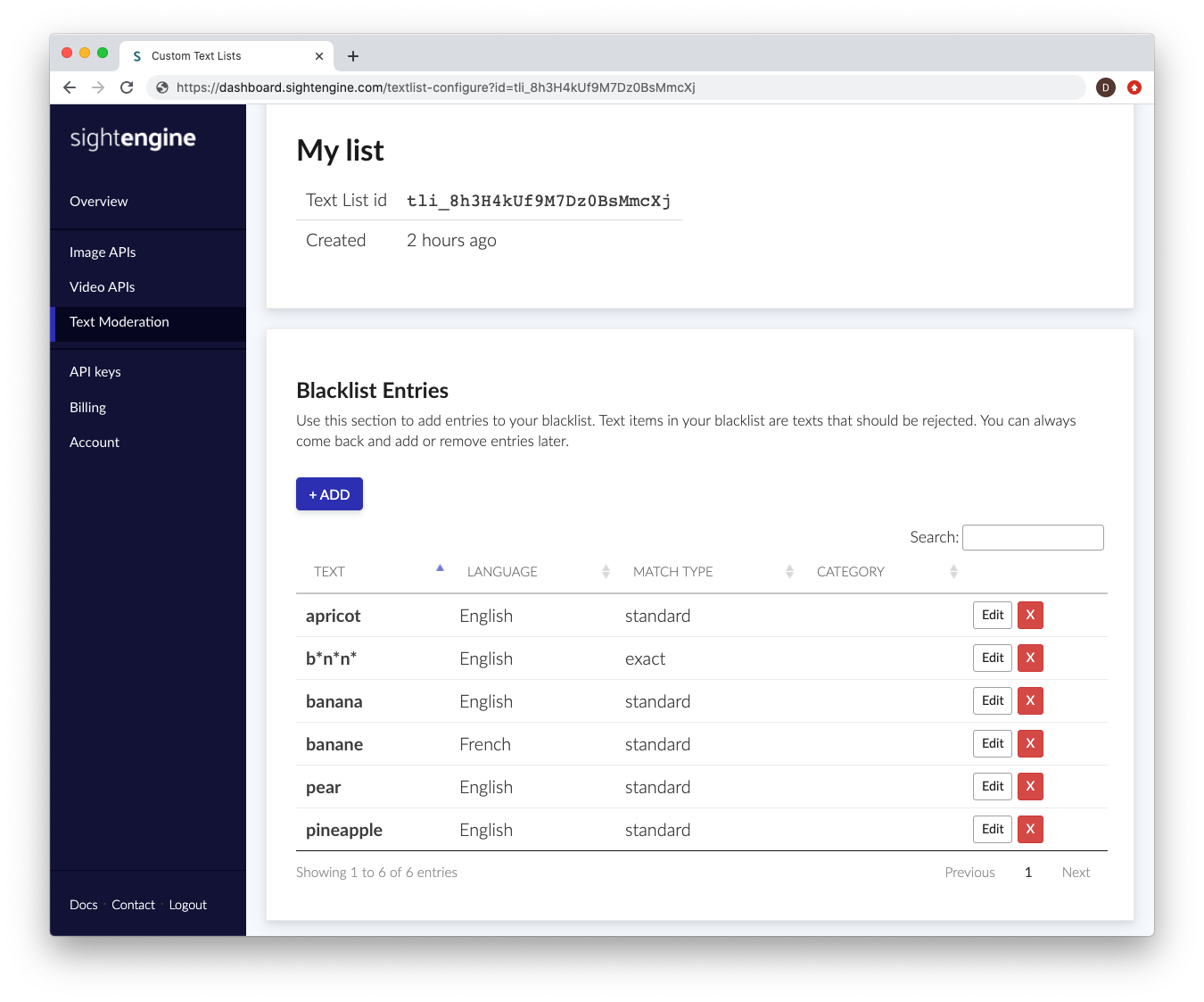
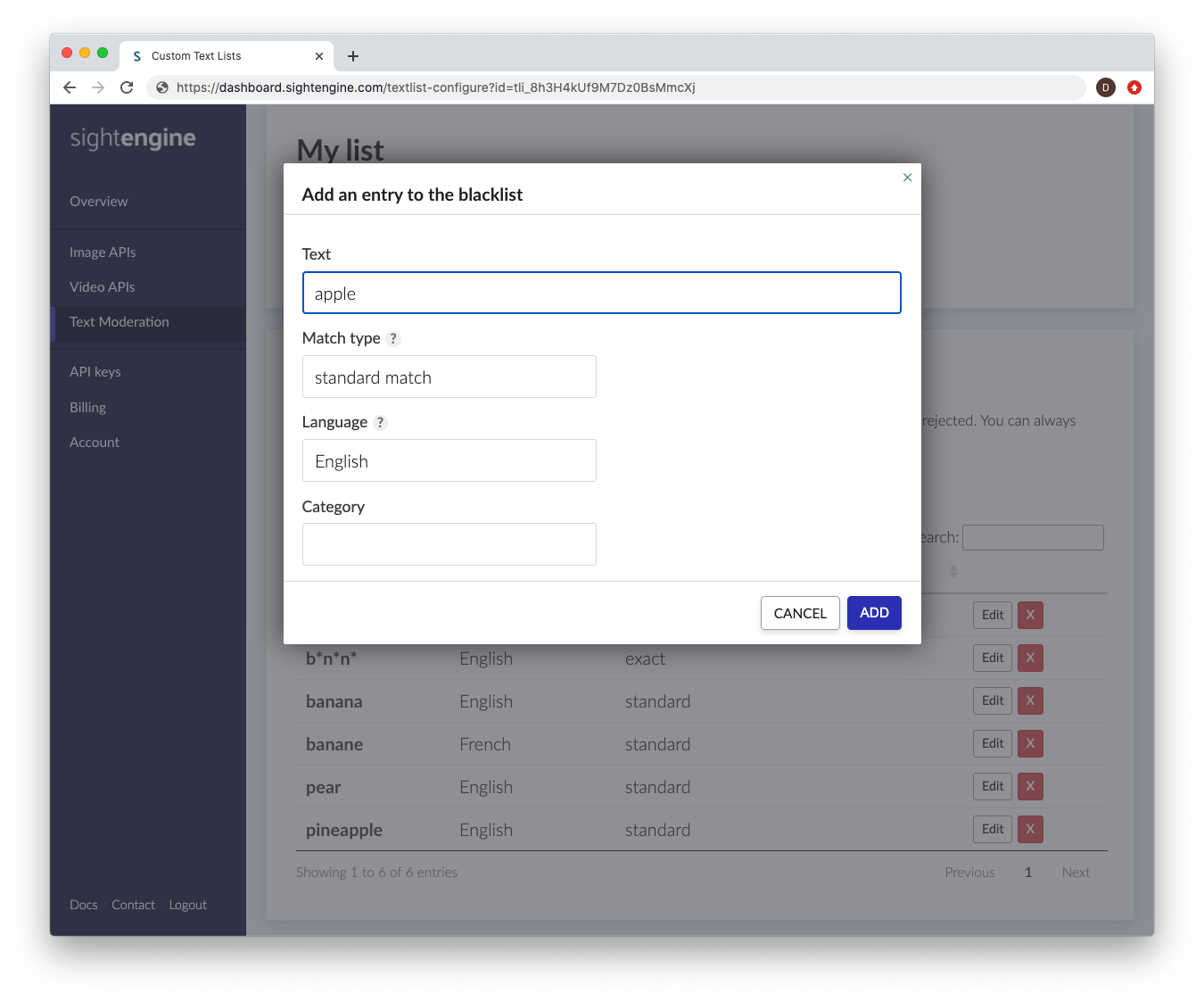
Each entry consists of a text item that you want to detect, along with metadata that helps the engine determine how and when this entry should be triggered. The following information is required:
- Text: The text item you want to detect.
- Language: The language to which the text item applies. If the same text appears in content identified as a different language, it will not be flagged. If you want the text item to be detected regardless of language, select all.
- Match type: Defines how the detection engine should match the entry.
Choose exact match to detect the exact string only (case-insensitive, but without other variations).
Choose standard match to detect variations such as phonetic substitutions, repetitions, typos, leetspeak, and other obfuscation attempts. This option typically covers millions of variations and prevents users from bypassing detection by slightly modifying the word. - Category: A custom categorization label for the text item, allowing you to organize and filter entries more easily.
While most users only need a single text list, you can create multiple lists to apply different moderation criteria to different types of content.
To use a custom list, specify the corresponding list ID in the opt_textlist parameter of your API request.
Use the model (images)
If you haven't already, create an account to get your own API keys.
Moderate text in images
Let's say you want to moderate the following image:

You can either share a URL to the image, or upload the image file.
Option 1: Send image URL
Here's how to proceed if you choose to share the image URL:
curl -X GET -G 'https://api.sightengine.com/1.0/check.json' \
    -d 'models=text-content-2.0' \
    -d 'text_categories=sexual,insult,inappropriate,discriminatory,phone_number,email' \
    -d 'opt_lang=en,fr,es,de' \
    -d 'opt_countries=us,gb,fr,de' \
    -d 'api_user={api_user}&api_secret={api_secret}' \
    --data-urlencode 'url=https://sightengine.com/assets/img/examples/example-text-ocr-3.jpg'
# this example uses requests
import requests
import json

params = {
  'url': 'https://sightengine.com/assets/img/examples/example-text-ocr-3.jpg',
  'models': 'text-content-2.0',
  'text_categories': 'sexual,insult,inappropriate,discriminatory,phone_number,email',
  'opt_lang': 'en,fr,es,de',
  'opt_countries': 'us,gb,fr,de',
  'api_user': '{api_user}',
  'api_secret': '{api_secret}'
}
r = requests.get('https://api.sightengine.com/1.0/check.json', params=params)

output = json.loads(r.text)
$params = array(
  'url' =>  'https://sightengine.com/assets/img/examples/example-text-ocr-3.jpg',
  'models' => 'text-content-2.0',
  'text_categories' => 'sexual,insult,inappropriate,discriminatory,phone_number,email',
  'opt_lang' => 'en,fr,es,de',
  'opt_countries' => 'us,gb,fr,de',
  'api_user' => '{api_user}',
  'api_secret' => '{api_secret}',
);

// this example uses cURL
$ch = curl_init('https://api.sightengine.com/1.0/check.json?'.http_build_query($params));
curl_setopt($ch, CURLOPT_RETURNTRANSFER, true);
$response = curl_exec($ch);
curl_close($ch);

$output = json_decode($response, true);
// this example uses axios
const axios = require('axios');

axios.get('https://api.sightengine.com/1.0/check.json', {
  params: {
    'url': 'https://sightengine.com/assets/img/examples/example-text-ocr-3.jpg',
    'models': 'text-content-2.0',
    'text_categories': 'sexual,insult,inappropriate,discriminatory,phone_number,email',
    'opt_lang': 'en,fr,es,de',
    'opt_countries': 'us,gb,fr,de',
    'api_user': '{api_user}',
    'api_secret': '{api_secret}',
  }
})
.then(function (response) {
  // on success: handle response
  console.log(response.data);
})
.catch(function (error) {
  // handle error
  if (error.response) console.log(error.response.data);
  else console.log(error.message);
});
See request parameter description
| Parameter | Type | Description |
| url | string | URL of the image to analyze |
| models | string | comma-separated list of models to apply |
| text_categories | string | comma-separated list of moderation categories |
| opt_lang | string | comma-separated list of target languages (optional) |
| opt_countries | string | comma-separated list of target countries for phone number detection (optional) |
| opt_textlist | string | id of a custom list (disallow or allow list) (optional) |
| api_user | string | your API user id |
| api_secret | string | your API secret |
Option 2: Send image file
Here's how to proceed if you choose to upload the image file:
curl -X POST 'https://api.sightengine.com/1.0/check.json' \
    -F 'media=@/path/to/image.jpg' \
    -F 'models=text-content-2.0' \
    -F 'text_categories=sexual,insult,inappropriate,discriminatory,phone_number,email' \
    -F 'opt_lang=en,fr,es,de' \
    -F 'opt_countries=us,gb,fr,de' \
    -F 'api_user={api_user}' \
    -F 'api_secret={api_secret}'
# this example uses requests
import requests
import json

params = {
  'models': 'text-content-2.0',
  'text_categories': 'sexual,insult,inappropriate,discriminatory,phone_number,email',
  'opt_lang': 'en,fr,es,de',
  'opt_countries': 'us,gb,fr,de',
  'api_user': '{api_user}',
  'api_secret': '{api_secret}'
}
files = {'media': open('/path/to/image.jpg', 'rb')}
r = requests.post('https://api.sightengine.com/1.0/check.json', files=files, data=params)

output = json.loads(r.text)
$params = array(
  'media' => new CurlFile('/path/to/image.jpg'),
  'models' => 'text-content-2.0',
  'text_categories' => 'sexual,insult,inappropriate,discriminatory,phone_number,email',
  'opt_lang' => 'en,fr,es,de',
  'opt_countries' => 'us,gb,fr,de',
  'api_user' => '{api_user}',
  'api_secret' => '{api_secret}',
);

// this example uses cURL
$ch = curl_init('https://api.sightengine.com/1.0/check.json');
curl_setopt($ch, CURLOPT_POST, true);
curl_setopt($ch, CURLOPT_RETURNTRANSFER, true);
curl_setopt($ch, CURLOPT_POSTFIELDS, $params);
$response = curl_exec($ch);
curl_close($ch);

$output = json_decode($response, true);
// this example uses axios and form-data
const axios = require('axios');
const FormData = require('form-data');
const fs = require('fs');

data = new FormData();
data.append('media', fs.createReadStream('/path/to/image.jpg'));
data.append('models', 'text-content-2.0');
data.append('text_categories', 'sexual,insult,inappropriate,discriminatory,phone_number,email');
data.append('opt_lang', 'en,fr,es,de');
data.append('opt_countries', 'us,gb,fr,de');
data.append('api_user', '{api_user}');
data.append('api_secret', '{api_secret}');

axios({
  method: 'post',
  url:'https://api.sightengine.com/1.0/check.json',
  data: data,
  headers: data.getHeaders()
})
.then(function (response) {
  // on success: handle response
  console.log(response.data);
})
.catch(function (error) {
  // handle error
  if (error.response) console.log(error.response.data);
  else console.log(error.message);
});
See request parameter description
| Parameter | Type | Description |
| media | file | image to analyze |
| models | string | comma-separated list of models to apply |
| text_categories | string | comma-separated list of moderation categories |
| opt_lang | string | comma-separated list of target languages (optional) |
| opt_countries | string | comma-separated list of target countries for phone number detection (optional) |
| opt_textlist | string | id of a custom list (disallow or allow list) (optional) |
| api_user | string | your API user id |
| api_secret | string | your API secret |
API response
The API will then return a JSON response with the following structure:
{
  "status": "success",
  "request": {
    "id": "req_22Qd0gUNmRH4GCYLvYtN6",
    "timestamp": 1512483673.1405,
    "operations": 1
  },
  "text": {
    "language": "en",
    "detected_categories": [
      "phone_number"
    ],
    "detections": {
      "phone_number": {
        "details": [
          {
            "country": "us",
            "match": "+1 800 222 2408"
          }
        ]
      }
    }
  },
  "media": {
      "id": "med_22Qdfb5s97w8EDuY7Yfjp",
      "uri": "https://sightengine.com/assets/img/examples/example-text-ocr-3.jpg"
  }
}
Successful Response
Status code: 200, Content-Type: application/json| Field | Type | Description |
| status | string | status of the request, either "success" or "failure" |
| request | object | information about the processed request |
| request.id | string | unique identifier of the request |
| request.timestamp | float | timestamp of the request in Unix time |
| request.operations | integer | number of operations consumed by the request |
| text | object | results for the model |
| media | object | information about the media analyzed |
| media.id | string | unique identifier of the media |
| media.uri | string | URI of the media analyzed: either the URL or the filename |
Error
Status codes: 4xx and 5xx. See how error responses are structured.Top-level information
| text.language | Language used for the moderation rules applied to this media. The language is automatically detected based on the list provided in the opt_lang field. |
| text.detected_categories | List of triggered moderation categories. Provides a quick overview of all detected unwanted content to allow fast filtering. |
| text.detections | Detailed detection information per detected category. |
Detections
For each detected category, the API returns additional information in the text.detections field, including the specific matches that triggered the category and their associated severity levels (if available).
Objects in text.detections have the following fields:
| Category-level severity | Optional aggregated severity for a detected category, computed from individual matches. | severity |
| Details | List of matches with additional details for each match. | details |
For each match, the available details depend on the category. Here are some examples of the information that may be provided for specific categories:
| Matched text | The exact text that triggered a category. | match |
| Match-level severity | Optional severity assigned to a specific detected match. | severity |
| Phone number country | Country associated with a detected phone number. | country |
| Link category | Category of a detected link (e.g., unsafe, adult, gambling, etc.). | category |
Use the model (videos)
Moderate text in videos
Option 1: Short video
Here's how to proceed to analyze a short video (less than 1 minute):
curl -X POST 'https://api.sightengine.com/1.0/video/check-sync.json' \
  -F 'media=@/path/to/video.mp4' \
  -F 'models=text-content-2.0' \
  -F 'text_categories=sexual,insult,inappropriate,discriminatory,phone_number,email' \
  -F 'opt_lang=en,fr,es,de' \
  -F 'opt_countries=us,gb,fr,de' \
  -F 'api_user={api_user}' \
  -F 'api_secret={api_secret}'
# this example uses requests
import requests
import json

params = {
  # specify the models you want to apply
  'models': 'text-content-2.0',
  'text_categories': 'sexual,insult,inappropriate,discriminatory,phone_number,email',
  'opt_lang': 'en,fr,es,de',
  'opt_countries': 'us,gb,fr,de',
  'api_user': '{api_user}',
  'api_secret': '{api_secret}'
}
files = {'media': open('/path/to/video.mp4', 'rb')}
r = requests.post('https://api.sightengine.com/1.0/video/check-sync.json', files=files, data=params)

output = json.loads(r.text)
$params = array(
  'media' => new CurlFile('/path/to/video.mp4'),
  // specify the models you want to apply
  'models' => 'text-content-2.0',
  'text_categories' => 'sexual,insult,inappropriate,discriminatory,phone_number,email',
  'opt_lang' => 'en,fr,es,de',
  'opt_countries' => 'us,gb,fr,de',
  'api_user' => '{api_user}',
  'api_secret' => '{api_secret}',
);

// this example uses cURL
$ch = curl_init('https://api.sightengine.com/1.0/video/check-sync.json');
curl_setopt($ch, CURLOPT_POST, true);
curl_setopt($ch, CURLOPT_RETURNTRANSFER, true);
curl_setopt($ch, CURLOPT_POSTFIELDS, $params);
$response = curl_exec($ch);
curl_close($ch);

$output = json_decode($response, true);
// this example uses axios and form-data
const axios = require('axios');
const FormData = require('form-data');
const fs = require('fs');

data = new FormData();
data.append('media', fs.createReadStream('/path/to/video.mp4'));
// specify the models you want to apply
data.append('models', 'text-content-2.0');
data.append('text_categories', 'sexual,insult,inappropriate,discriminatory,phone_number,email');
data.append('opt_lang', 'en,fr,es,de');
data.append('opt_countries', 'us,gb,fr,de');
data.append('api_user', '{api_user}');
data.append('api_secret', '{api_secret}');

axios({
  method: 'post',
  url:'https://api.sightengine.com/1.0/video/check-sync.json',
  data: data,
  headers: data.getHeaders()
})
.then(function (response) {
  // on success: handle response
  console.log(response.data);
})
.catch(function (error) {
  // handle error
  if (error.response) console.log(error.response.data);
  else console.log(error.message);
});
See request parameter description
| Parameter | Type | Description |
| media | file | image to analyze |
| models | string | comma-separated list of models to apply |
| interval | float | frame interval in seconds, out of 0.5, 1, 2, 3, 4, 5 (optional) |
| api_user | string | your API user id |
| api_secret | string | your API secret |
Option 2: Long video
Here's how to proceed to analyze a long video. Note that if the video file is very large, you might first need to upload it through the Upload API.
curl -X POST 'https://api.sightengine.com/1.0/video/check.json' \
  -F 'media=@/path/to/video.mp4' \
  -F 'models=text-content-2.0' \
  -F 'callback_url=https://yourcallback/path' \
  -F 'text_categories=sexual,insult,inappropriate,discriminatory,phone_number,email' \
  -F 'opt_lang=en,fr,es,de' \
  -F 'opt_countries=us,gb,fr,de' \
  -F 'api_user={api_user}' \
  -F 'api_secret={api_secret}'
# this example uses requests
import requests
import json

params = {
  # specify the models you want to apply
  'models': 'text-content-2.0',
  # specify where you want to receive result callbacks
  'callback_url': 'https://yourcallback/path',
  'text_categories': 'sexual,insult,inappropriate,discriminatory,phone_number,email',
  'opt_lang': 'en,fr,es,de',
  'opt_countries': 'us,gb,fr,de',
  'api_user': '{api_user}',
  'api_secret': '{api_secret}'
}
files = {'media': open('/path/to/video.mp4', 'rb')}
r = requests.post('https://api.sightengine.com/1.0/video/check.json', files=files, data=params)

output = json.loads(r.text)
$params = array(
  'media' => new CurlFile('/path/to/video.mp4'),
  // specify the models you want to apply
  'models' => 'text-content-2.0',
  // specify where you want to receive result callbacks
  'callback_url' => 'https://yourcallback/path',
  'text_categories' => 'sexual,insult,inappropriate,discriminatory,phone_number,email',
  'opt_lang' => 'en,fr,es,de',
  'opt_countries' => 'us,gb,fr,de',
  'api_user' => '{api_user}',
  'api_secret' => '{api_secret}',
);

// this example uses cURL
$ch = curl_init('https://api.sightengine.com/1.0/video/check.json');
curl_setopt($ch, CURLOPT_POST, true);
curl_setopt($ch, CURLOPT_RETURNTRANSFER, true);
curl_setopt($ch, CURLOPT_POSTFIELDS, $params);
$response = curl_exec($ch);
curl_close($ch);

$output = json_decode($response, true);
// this example uses axios and form-data
const axios = require('axios');
const FormData = require('form-data');
const fs = require('fs');

data = new FormData();
data.append('media', fs.createReadStream('/path/to/video.mp4'));
// specify the models you want to apply
data.append('models', 'text-content-2.0');
// specify where you want to receive result callbacks
data.append('callback_url', 'https://yourcallback/path');
data.append('text_categories', 'sexual,insult,inappropriate,discriminatory,phone_number,email');
data.append('opt_lang', 'en,fr,es,de');
data.append('opt_countries', 'us,gb,fr,de');
data.append('api_user', '{api_user}');
data.append('api_secret', '{api_secret}');

axios({
  method: 'post',
  url:'https://api.sightengine.com/1.0/video/check.json',
  data: data,
  headers: data.getHeaders()
})
.then(function (response) {
  // on success: handle response
  console.log(response.data);
})
.catch(function (error) {
  // handle error
  if (error.response) console.log(error.response.data);
  else console.log(error.message);
});
See request parameter description
| Parameter | Type | Description |
| media | file | image to analyze |
| callback_url | string | callback URL to receive moderation updates (optional) |
| models | string | comma-separated list of models to apply |
| interval | float | frame interval in seconds, out of 0.5, 1, 2, 3, 4, 5 (optional) |
| api_user | string | your API user id |
| api_secret | string | your API secret |
Option 3: Live-stream
Here's how to proceed to analyze a live-stream:
curl -X GET -G 'https://api.sightengine.com/1.0/video/check.json' \
    --data-urlencode 'stream_url=https://domain.tld/path/video.m3u8' \
    -d 'models=text-content-2.0' \
    -d 'callback_url=https://your.callback.url/path' \
    -d 'api_user={api_user}' \
    -d 'api_secret={api_secret}'
# this example uses requests
import requests
import json

params = {
  'stream_url': 'https://domain.tld/path/video.m3u8',
  # specify the models you want to apply
  'models': 'text-content-2.0',
  # specify where you want to receive result callbacks
  'callback_url': 'https://your.callback.url/path',
  'api_user': '{api_user}',
  'api_secret': '{api_secret}'
}
r = requests.post('https://api.sightengine.com/1.0/video/check.json', data=params)

output = json.loads(r.text)
$params = array(
  'stream_url' => 'https://domain.tld/path/video.m3u8',
  // specify the models you want to apply
  'models' => 'text-content-2.0',
  // specify where you want to receive result callbacks
  'callback_url' => 'https://your.callback.url/path',
  'api_user' => '{api_user}',
  'api_secret' => '{api_secret}',
);

// this example uses cURL
$ch = curl_init('https://api.sightengine.com/1.0/video/check.json');
curl_setopt($ch, CURLOPT_POST, true);
curl_setopt($ch, CURLOPT_RETURNTRANSFER, true);
curl_setopt($ch, CURLOPT_POSTFIELDS, $params);
$response = curl_exec($ch);
curl_close($ch);

$output = json_decode($response, true);
// this example uses axios and form-data
const axios = require('axios');
const FormData = require('form-data');
const fs = require('fs');

data = new FormData();
data.append('stream_url', 'https://domain.tld/path/video.m3u8');
// specify the models you want to apply
data.append('models', 'text-content-2.0');
// specify where you want to receive result callbacks
data.append('callback_url', 'https://your.callback.url/path');
data.append('api_user', '{api_user}');
data.append('api_secret', '{api_secret}');

axios({
  method: 'post',
  url:'https://api.sightengine.com/1.0/video/check.json',
  data: data,
  headers: data.getHeaders()
})
.then(function (response) {
  // on success: handle response
  console.log(response.data);
})
.catch(function (error) {
  // handle error
  if (error.response) console.log(error.response.data);
  else console.log(error.message);
});
See request parameter description
| Parameter | Type | Description |
| stream_url | string | URL of the video stream |
| callback_url | string | callback URL to receive moderation updates (optional) |
| models | string | comma-separated list of models to apply |
| interval | float | frame interval in seconds, out of 0.5, 1, 2, 3, 4, 5 (optional) |
| api_user | string | your API user id |
| api_secret | string | your API secret |
Moderation result
The Moderation result will be provided either directly in the request response (for sync calls, see below) or through the callback URL your provided (for async calls).
Here is the structure of the JSON response with moderation results for each analyzed frame under the data.frames array:
{
  "status": "success",
  "request": {
    "id": "req_gmgHNy8oP6nvXYaJVLq9n",
    "timestamp": 1717159864.348989,
    "operations": 21
  },
  "data": {
    "frames": [
      {
        "info": {
          "id": "med_gmgHcUOwe41rWmqwPhVNU_1",
          "position": 0
        },
        "text": {
          "language": "en",
          "detected_categories": [
            "phone_number"
          ],
          "detections": {
            "phone_number": {
              "details": [
                {
                  "country": "us",
                  "match": "+1 800 222 2408"
                }
              ]
            }
          }
        },
      },
     ...
    ]
  },
  "media": {
    "id": "med_gmgHcUOwe41rWmqwPhVNU",
    "uri": "yourfile.mp4"
  },
}
You can use the classes under the text object to analyze text content in the video.
Top-level information
| text.language | Language used for the moderation rules applied to this media. The language is automatically detected based on the list provided in the opt_lang field. |
| text.detected_categories | List of triggered moderation categories. Provides a quick overview of all detected unwanted content to allow fast filtering. |
| text.detections | Detailed detection information per detected category. |
Detections
For each detected category, the API returns additional information in the text.detections field, including the specific matches that triggered the category and their associated severity levels (if available).
Objects in text.detections have the following fields:
| Category-level severity | Optional aggregated severity for a detected category, computed from individual matches. | severity |
| Details | List of matches with additional details for each match. | details |
For each match, the available details depend on the category. Here are some examples of the information that may be provided for specific categories:
| Matched text | The exact text that triggered a category. | match |
| Match-level severity | Optional severity assigned to a specific detected match. | severity |
| Phone number country | Country associated with a detected phone number. | country |
| Link category | Category of a detected link (e.g., unsafe, adult, gambling, etc.). | category |